When an agent gets access to tools, it gets the ability to act.
It can:
- Read data
- Call APIs
- Start processes
- Change system state
And this is exactly where a new risk appears.
Because the agent does not know that:
- This API costs money
- This process can break the system
- This data must not be changed
It only sees the goal.
And if reaching that goal requires an action, it will try to perform it.
Even if that action is:
- Expensive
- Dangerous
- Or irreversible
That is why in real systems the agent is not given full access to everything.
It is limited by:
- Which tools are available
- Which actions are allowed
- And when it must stop
Without these limits, an agent is not an executor.
It is a process that can go too far.
What "allowed tool" means
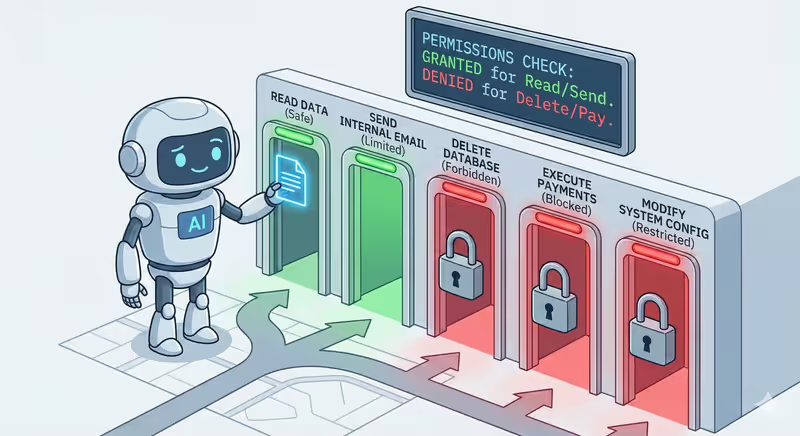
Not every tool that exists in the system should be available to the agent.
Before work starts, it receives only the tools it is allowed to use.
But access to a tool is not the whole story.
Even if the agent has a tool, it does not mean it can do everything with it.
There are two access levels:
Two access levels
When we say an agent has an "allowed tool," it can mean two different things:
- Whether the agent has access to the tool at all
- What exactly it can do inside that tool
1️⃣ Access to the tool
First, the system decides:
Which tools the agent can see at all
| Tool is given to the agent | Tool is hidden from the agent |
|---|---|
✅ Database | ❌ Payment system |
✅ Email | ❌ Admin panel |
✅ File storage | ❌ System settings |
If a tool is not provided, the agent does not know it exists.
It cannot:
- Call it
- Ask for it
- Use it by accident
2️⃣ Actions inside the tool
But even if a tool is available, that does not mean full control.
One tool can support multiple actions.
For example: Database
| Allowed in database | Forbidden in database |
|---|---|
| ✅ View records | ❌ Modify existing records |
| ✅ Create new records | ❌ Delete records |
How this works together
So the agent sees the tool, but can use only part of its capabilities.
If it tries a forbidden action, the system simply will not allow it.
The request will be rejected.
And the agent receives:
{
  "error": "Action not allowed"
}
After that, it must choose another step.
How these limits are set
In a real system, limits are defined before the agent starts working.
It is configured with:
- Which tools are available
- Which actions are allowed
- Which parameters can be passed
For example:
- Allow reading data only from a specific table
- Send emails only inside the company
- Work only with files in one specific folder
So the agent gets not just tools, but clear usage rules.
When it requests an action, the system checks:
- Whether the tool is allowed
- Whether the action is allowed
- Whether the parameters match the rules
And only then executes it.
If at least one condition is not met, the request is blocked.
In code this looks like
Below is the same principle in a simple format (as in tool-calling-basics).
First, we have tools:
def read_user(user_id: int):
    return {"id": user_id, "name": "Anna"}


def delete_user(user_id: int):
    return {"deleted": user_id}


TOOLS = {
    "database": {
        "read_user": read_user,
        "delete_user": delete_user,
    }
}
Here, we define what exactly is allowed:
ALLOWED_TOOLS = {"database"}
ALLOWED_ACTIONS = {
    "database": {"read_user"}  # delete_user is forbidden
}
Now the model forms the request (what exactly it wants to do):
model_output = {
    "tool": "database",
    "action": "read_user",
    "parameters": {"user_id": 123}
}
The system receives this request and checks rules before execution:
def run_tool_call(call: dict):
    tool = call["tool"]
    action = call["action"]
    params = call["parameters"]

    if tool not in ALLOWED_TOOLS:
        return {"error": "Tool not allowed"}

    if action not in ALLOWED_ACTIONS.get(tool, set()):
        return {"error": "Action not allowed"}

    if action == "read_user" and "user_id" not in params:
        return {"error": "Invalid parameters"}

    return TOOLS[tool][action](**params)
If everything is okay, we get a result:
result = run_tool_call(model_output)
# {"id": 123, "name": "Anna"}
If the model requests a forbidden action (delete_user), the system returns:
{
  "error": "Action not allowed"
}
Full implementation example with connected LLM
Real-life analogy
Imagine you give an assistant a bank card. But with a limit.
| Assistant can | Assistant cannot |
|---|---|
| ✅ Pay for a subscription | ❌ Withdraw cash |
| ✅ Book a taxi | ❌ Make a transfer |
| ✅ Buy office supplies | ❌ Spend more than $100 |
The card is the same.
But the usage rules are different.
Same with tools.
The agent can have access to the database. But read-only.
It can send emails. But only inside the company.
It can call APIs. But only with a limited budget.
It sees the tool, but cannot use it however it wants.
What happens if the agent goes out of bounds
The agent can request any action.
But that does not mean the action will be executed.
If it:
- Calls a forbidden tool
- Passes forbidden parameters
- Or exceeds a configured limit
The system simply blocks the request.
And returns:
{
  "error": "Action not allowed"
}
For the agent, this looks like just another action result.
It sees that this path is closed and must choose another.
Maybe:
- Use another tool
- Change parameters
- Or finish the task with what it has
This is how limits do not stop the agent completely.
They only define where it can act and where it must stop.
In short
Tool access is not just "allowed" or "forbidden."
It is a set of rules that defines:
- Which tools the agent can use
- Which actions inside them are allowed
- Which parameters can be passed
When the agent goes out of bounds, the system blocks the request.
But this does not stop the work. It forces another path.
That is how limits turn an agent into a controlled executor, not an uncontrolled process.
FAQ
Q: Does access to a tool mean full control over it?
A: No. The agent can have access to a tool but use only allowed actions.
Q: What happens if the agent asks for a forbidden action?
A: The system checks the request and blocks it if it violates configured rules.
Q: Does the agent stop after an action is blocked?
A: No. It receives the result and must choose another available step.
What is next
Now you know how to restrict an agent's access to tools.
But another question appears:
How does the agent decide what to do at all?
When it receives a task, does it plan all steps ahead like a person with a to-do list?
Or does it react to the situation, choosing the next obvious step?
These are not just different approaches.
This defines how the agent behaves during work and when it can go in the wrong direction.