Pattern essence
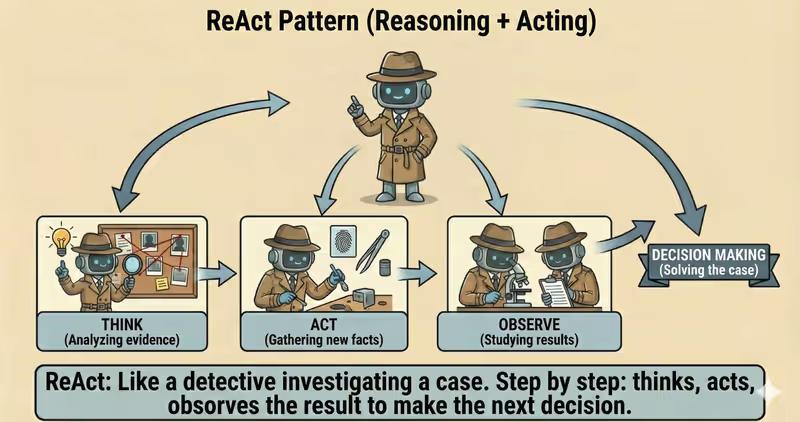
ReAct (Reasoning + Acting) is a pattern that lets an agent operate step by step, making a decision after each action based on the result it received.
When to use it: when it is impossible to reliably plan the full path in advance, and the next step depends on the previous result.
Each step has three actions:
Think— decides what to do nextAct— performs an action or calls a toolObserve— analyzes the result
After that, the agent decides again which step to take next.
Problem
Imagine this: you are in a new city for the first time and looking for an open pharmacy with the medicine you need.
You still do not know in advance:
- which pharmacies are nearby
- whether they are open right now
- whether they have the required medicine
It is impossible to build a full plan immediately, because each step depends on a new result.
So you act in a loop:
- Found the nearest pharmacy
- Checked whether it is open
- If not, moved to the next one
- Repeated until you found the right one
So it is always: information -> decision -> action -> new information.
And if you force yourself to lock the route up front ("#1 -> #2 -> #3"), that is a guess-based plan.
That is the problem: in many tasks, it is impossible to correctly plan all steps in advance.
Solution
ReAct solves this through decisions during execution, not through a rigid upfront plan.
Analogy: it is like navigation on the road. You plan the next maneuver after each new turn or road closure. The route is refined on the fly, not fixed once and forever.
Key principle: a full plan cannot be built immediately, so the agent must adapt after each result.
Instead of full plan first -> execution after, the agent works like this:
- Reasoning (
Think): makes a decision - Action (
Act): executes an action - Observation (
Observe): analyzes the result
After that, it defines the next step based on the new context.
If a pharmacy is closed, the agent does not "force" the old plan and adjusts actions immediately.
Each new result:
- is added to context
- affects the next decision
- changes the following route
ReAct does not execute a pre-written script. It adapts at every step.
The model may "want" to repeat actions endlessly, so the execution policy (execution-policy) is what defines the loop stop conditions.
How it works
Important: the agent does not execute actions itself
At the reasoning (Think) stage, the agent only decides what should be done next.
But it does not execute the action on its own.
It generates a decision as text, for example:
“Need to call tool
search_docswith parameter X”
After that:
- the system around the agent reads this decision
- executes the action or calls the tool
- returns the result back
This result becomes a new observation (Observe).
Full flow description: Think → Act → Observe
Reasoning (Think)
The agent decides what should be done next.
Action (Act)
The system executes the action or calls a tool.
Observation (Observe)
The environment returns a result, which becomes new context.
The agent only makes decisions.
All actions are performed by an external execution layer (execution layer).
If this layer has no constraints, the agent can:
- call a tool dozens of times
- repeat the same actions
- spend the budget on API calls
The loop repeats until the task is done or stop conditions are reached.
In code it looks like this
max_steps = 8

for step_no in range(1, max_steps + 1):
    thought = think(context)
    action = act(thought)
    result = observe(action)

    context.append(result)  # Observe -> new context for the next Think.

    if is_done(result):
        done = True
        break

if not done:
    return stop_with_reason("max_steps_reached")
How this looks during execution
Goal: find the nearest open pharmacy

Think: need to find a nearby pharmacy
Act: the system calls find_nearby_pharmacies(user_location)
Observe: received a list of pharmacies sorted by distance
Between iterations: the pharmacy list is added to context

Think: check the first (nearest) pharmacy
Act: the system calls check_pharmacy("Pharmacy #1")
Observe: pharmacy is closed
Between iterations: the "closed" status is added to context

Think: check the next pharmacy
Act: the system calls check_pharmacy("Pharmacy #2")
Observe: pharmacy is open

Think: this is the nearest open pharmacy
Act: the system returns the address
Observe: the user received the result
Stop: condition met, the loop ends
The agent decides what to do, executes an action, and gets a result.
Each result is added to context and becomes the basis for the next step.
Full ReAct agent example
When it fits - and when it does not
Fits
| Situation | Why ReAct fits | |
|---|---|---|
| ✅ | The path to the result is unclear | ReAct refines the plan at each step from new observations. |
| ✅ | The next step depends on a tool response | The Think -> Act -> Observe logic is built exactly for this loop. |
| ✅ | You need to work with APIs, databases, search, or other tools | The agent calls tools during execution and adapts. |
Does not fit
| Situation | Why ReAct does not fit | |
|---|---|---|
| ❌ | The task has a fixed, predictable scenario | It is simpler and cheaper to run a predefined pipeline. |
| ❌ | Critical response speed is required (minimum latency) | Each loop adds time through extra reasoning steps and calls. |
| ❌ | Each tool call is expensive or strictly limited | Without hard limits, ReAct may do many iterations. |
If you choose ReAct, set limits upfront: max_steps, timeouts, stop conditions, and a tool-call budget.
When to use ReAct among other patterns
Use ReAct when the agent must make decisions step by step based on the results of previous actions.
Quick test:
- if you need "saw a result -> decided the next step" -> ReAct
- if you need "first split a large goal into subtasks" -> Task Decomposition Agent
Comparison with other patterns and examples
Quick cheat sheet:
| If the task looks like this... | Use |
|---|---|
| After each step, you need to decide what to do next | ReAct Agent |
| First, you need to split a large goal into smaller executable tasks | Task Decomposition Agent |
| You need to run code, verify results, and iterate safely | Code Execution Agent |
| You need to analyze data and return conclusions based on that analysis | Data Analysis Agent |
| You need research from multiple sources with structured evidence | Research Agent |
Examples:
ReAct: "Find the cause of the API outage: check logs -> inspect errors -> run the next check based on the result".
Task Decomposition: "Prepare a new pricing launch: split the task into subtasks for content, engineering, QA, and support".
Code Execution: "Calculate 12-month retention in Python and verify formula correctness on real data".
Data Analysis: "Analyze a sales CSV: find trends, anomalies, and provide short conclusions".
Research: "Collect data on 5 competitors from multiple sources and produce a comparative summary".
Not sure whether your scenario really needs ReAct? Design Your Agent →
How to combine with other patterns
ReAct is often used together with other patterns.
- ReAct + RAG — when facts are missing, the agent first retrieves them from the knowledge base and only then takes the next step.
- ReAct + Reflection — after each step, the agent self-checks to quickly spot and fix errors.
- ReAct + Supervisor — the agent does not execute risky actions by itself; it hands them off for human approval.
ReAct adds a decision loop. Other patterns add control, memory, or coordination.
In short
ReAct Agent:
- makes decisions gradually
- executes an action
- analyzes the result
And repeats the loop until the task is completed.
Pros and Cons
Pros
adapts quickly to new data
errors are visible already on the next step
works well when conditions change during execution
each step is easy to explain
Cons
can be slower because of more steps
can get stuck in a loop without limits
requires clearly defined stop conditions
FAQ
Q: Does ReAct plan all steps in advance?
A: No. It makes decisions after each action.
Q: Can ReAct get stuck in a loop?
A: Yes, if stop conditions are not defined.
Q: Does ReAct work without tools?
A: Yes. The agent can use the Think -> Act -> Observe loop even without tool calls, for example to change the approach to a task. But without access to external actions, it cannot get new data and works only with what is already in context.
What next
ReAct allows an agent to act step by step.
But what should you do if the task is complex and consists of several subtasks?