Pattern Essence
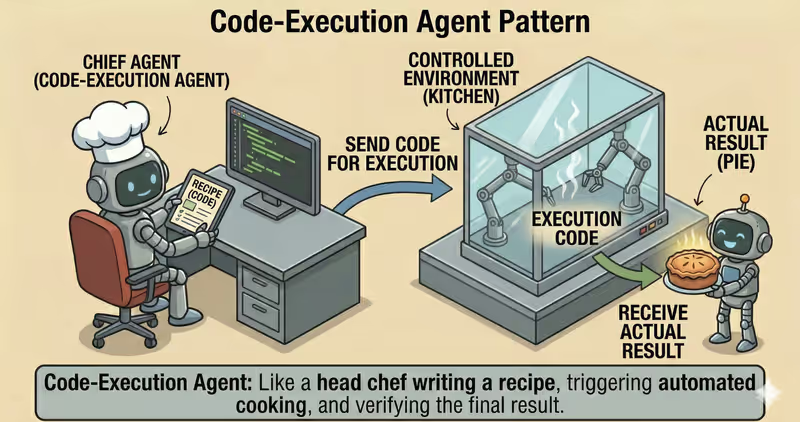
Code-Execution Agent is a pattern where the agent does not only reason in text, but also runs generated code in a controlled environment, gets a factual result, and continues from it.
When to use it: when the answer must be computed or verified by running code, not just generated as text.
The agent:
Generate: writes short task-specific codeRun: executes it in a sandboxObserve: collects the real resultExplain: returns the result with explanation
Problem
Imagine you ask:
"Calculate average conversion from this CSV."
The agent writes a script and says: "Average conversion is 3.84%".
But without a controlled environment you cannot see:
- what exactly was executed
- which files were read
- whether there were network call attempts
- how many resources the code consumed
In code execution, not only code logic matters, but also the environment boundaries where it runs.
That is the problem: the result depends on both code and runtime environment, so "just run it" is unsafe and opaque.
Solution
Code-Execution Agent runs code only through a controlled execution layer.
Analogy: this is like a lab with safety rules. An experiment is allowed only in an isolated room and under policy constraints. This lowers the risk of damaging the environment or leaking extra data.
Key principle: the model may write code, but execution is allowed only in a sandbox and after policy checks.
Base constraints:
- sandbox runtime
- restricted file access
- no network
- CPU/RAM/time limits
Controlled loop:
- Planning: define the minimum script for the task
- Generate: produce code
- Policy check: verify safety and allowed operations
- Isolated run: execute code in sandbox
- Result validation: check correctness and risk of output
If policy check or output validation fails, execution is stopped or escalated.
This protects against cases where the agent might:
- read sensitive files
- send data out
- hang in long loops
- run dangerous operations
Reliable code execution is not "just running code", but running code that runtime-policy cannot bypass technically.
How It Works
The key element is sandbox.
It usually limits:
file system: access only to working directorynetwork: often fully disabledresources:CPU/RAM/time quotasruntime environment: allowed libraries and syscalls
Full flow description: Plan → Generate Code → Policy Check → Execution Layer → Sandbox Run → Validate → Return
Planning
The agent determines what exactly must be computed and what output format is expected.
Code generation
The model generates minimal code for a specific step, without unnecessary volume.
Policy check
Generated code passes policy-engine: allowed libraries, computation type, and acceptable resource intensity.
Execution layer
The system prepares controlled execution: environment, limits, and access rules.
Sandbox run
Code executes in isolation with hard limits.
Validation
The system checks output format, errors, security policies, and conformance to expected schema.
Return result
The user gets a valid response or a controlled stop/escalation.
In Code It Looks Like This
code = agent.generate_code(goal, constraints={
    "language": "python",
    "no_network": True,
    "max_seconds": 5,
})

exec_result = execution_layer.run_code(
    code=code,
    policy="sandboxed_python",
)

if not exec_result.success:
    return fallback_or_stop(exec_result.error)

validated = validate_output(exec_result.stdout, schema=expected_schema)
if not validated.ok:
    return stop_with_reason(validated.reason)

return format_answer(validated.data)
Main rule: never execute generated code outside sandbox and policy control.
What It Looks Like During Execution
Goal: calculate conversion from a CSV report

Generate Code:
- read sales.csv
- compute conversion_rate = paid / leads
- output a table by day

Sandbox Run:
- timeout: 5s
- memory: 256MB
- network: disabled

Output:
- table with 7 rows
- average conversion: 3.84%
Full Code-Execution agent example
When It Fits - and When It Does Not
Good Fit
| Situation | Why Code-Execution Fits | |
|---|---|---|
| ✅ | You need factual computation, not textual guesses | Code execution gives factual output instead of model guessing. |
| ✅ | Working with tables, files, formulas | You need actual step execution, not only textual description. |
| ✅ | Reproducibility of results matters | Running in a controlled execution environment makes result verification easier. |
| ✅ | You have sandbox + enforced policies | Safe infrastructure allows code execution without critical risk. |
Not a Good Fit
| Situation | Why Code-Execution Does Not Fit | |
|---|---|---|
| ❌ | Purely text task | Running code adds unnecessary complexity with no value. |
| ❌ | No isolated runtime environment | Without sandbox, generated code cannot be executed safely. |
| ❌ | Risk is higher than value | Potential damage does not justify execution in this case. |
Because code execution adds operational requirements: sandbox, resource limits, monitoring, and run audits.
How It Differs from Guarded-Policy
| Guarded-Policy | Code-Execution | |
|---|---|---|
| Main focus | What is allowed to run | How to run generated code safely |
| Key mechanism | Policy gate | Sandbox runtime + output validation |
| When it triggers | Before action | During and after code run |
| Risk without pattern | Unsafe action reaches execution | Unreliable or unsafe execution output |
Guarded-Policy decides whether action is allowed at all. Code-Execution decides how to execute code action safely and reproducibly.
When to Use Code-Execution (vs Other Patterns)
Use Code-Execution when the agent must run code, verify outputs, and iterate safely.
Quick test:
- if you need to "run code and work with factual output" -> Code-Execution
- if you only need to "break a large task into subtasks first" -> Task Decomposition Agent
Comparison with other patterns and examples
Quick cheatsheet:
| If the task looks like this... | Use |
|---|---|
| After each step you must decide what to do next | ReAct Agent |
| You first need to break a large goal into smaller executable tasks | Task Decomposition Agent |
| You need to run code, verify results, and iterate safely | Code Execution Agent |
| You need to analyze data and return conclusions based on analysis | Data Analysis Agent |
| You need multi-source research with structured evidence | Research Agent |
Examples:
ReAct: "Find root cause of API outage: check logs -> inspect errors -> run the next check based on result."
Task Decomposition: "Prepare new pricing launch: split into subtasks for content, engineering, QA, and support."
Code Execution: "Calculate 12-month retention in Python and verify formula correctness on real data."
Data Analysis: "Analyze sales CSV: find trends, anomalies, and provide short conclusions."
Research: "Collect data on 5 competitors from multiple sources and produce a comparative summary."
Not sure whether this case really needs Code Execution? Design Your Agent →
How to Combine with Other Patterns
- Code-Execution + Guarded-Policy: before run, the agent checks code against safety rules and blocks dangerous actions.
- Code-Execution + Fallback-Recovery: if execution hangs or fails, the agent switches to a safe fallback scenario.
- Code-Execution + Supervisor: risky runs are not executed automatically; they are routed for human approval.
In Short
Code-Execution Agent:
- Generates code for a specific task
- Executes it in isolated sandbox
- Validates output before final answer
- Improves accuracy for computation tasks
Pros and Cons
Pros
gives more accurate computation results
result is easy to verify and reproduce
you can see exactly what code was run
convenient for working with files and data
Cons
requires an isolated runtime environment
response can be slower due to code execution
runtime code errors are possible
FAQ
Q: Can we execute code directly on a server without isolation?
A: For production: no. You need isolation, resource limits, and control over allowed operations.
Q: Does code execution guarantee correctness of output?
A: Not fully. You still need output validation, invariant tests, and policy checks.
Q: What if code fails during execution?
A: Use bounded recovery: retry, fallback execution environment, or controlled stop with stop reason.
What Next
Code-Execution approach lets an agent run computations reliably.
But how do you apply this to full analytics: data cleaning, aggregates, charts, and conclusions?