Pattern Essence
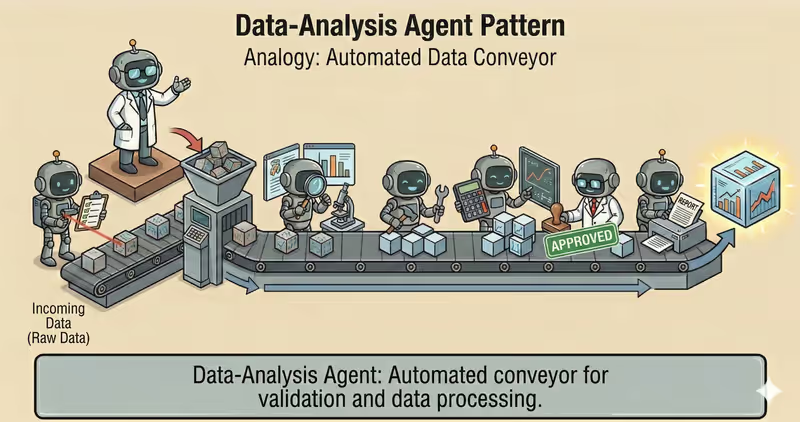
Data-Analysis Agent is a pattern where the agent works with tabular or time-series data through a controlled analytics pipeline: policy check, ingest, profile, transform, analyze, validate, report.
When to use it: when you need to compute and verify metrics on real data, not describe them in generic words.
Unlike "just answer", the agent performs step-by-step analytics:
Ingest + profile: reads data and checks qualityTransform: cleans outliers and missing values by rulesAnalyze: computes metrics, KPI, and aggregatesValidate: checks result consistencyReport: builds conclusions and artifacts for audit
Problem
Imagine you ask:
"How much did we earn last week?"
You get a number, but you do not understand what happened to data before calculation.
Critical questions remain:
- were refunds included
- were duplicates removed
- how missing values were handled
- whether data parts were dropped during "cleaning"
Analytics without a fixed process gives numbers that are hard to explain, verify, and reproduce.
That is why different people can calculate the same dataset differently.
That is the core problem: without a transparent pipeline, analysis output becomes unpredictable and non-auditable.
Solution
Data-Analysis Agent works through a fixed analytics pipeline.
Analogy: this is like lab analysis. First, they take a sample and check quality, then they compute indicators. Without this sequence, numbers cannot be trusted.
Core principle: value is not only in a number, but in the fact that each analysis step is explainable and reproducible.
The agent cannot "just calculate immediately" - it must pass the steps:
- Policy check: verify access to source
- Ingest: load data
- Profile: inspect structure and quality
- Transform: clean by rules
- Analyze: compute metrics
- Validate: verify result
And it must record:
- data source
- cleaning rules
- executed checks
- data limitations
This makes it possible to show, for example:
- which rows were removed
- how missing values were handled
- which outliers were detected
- which invariants passed
Works well if:
- ingest step cannot be skipped
- cleaning rules are fixed
- validation step is mandatory
- execution layer does not allow bypassing pipeline steps
Reliable analytics is a pipeline the agent cannot bypass technically.
How It Works
This pattern often uses Code-Execution Agent to run calculations in a sandbox.
Key difference: the focus here is not code execution itself, but a full analytics cycle with quality control gates.
Full flow: Policy Check → Ingest → Profile → Transform → Analyze → Validate → Report
Policy Check
Before processing, the system verifies source, access role, and data sensitivity (PII).
Ingest
Data is loaded with source, period, and version recorded.
Profile
The agent checks schema, missing values, duplicates, and outliers.
Transform
Cleaning and normalization: field types, filters, missing values handling.
Analyze
Computes KPI, aggregates, and comparisons.
Validate
The system checks invariants: metric ranges, no negative values, aggregate consistency.
Report
Builds output: tables, charts, key conclusions, and evidence.
In Code, It Looks Like This
decision = policy_engine.evaluate_source(source, user_role=user_role)
if decision.type != "allow":
    return stop_with_reason("source_policy_denied")

df = load_data(source)
profile = profile_data(df)

if profile.schema_mismatch:
    return stop_with_reason("schema_mismatch")

df_clean = clean_data(df, rules=cleaning_rules)
metrics = compute_metrics(df_clean)

checks = validate_metrics(metrics, rules=[
    "no_negative_revenue",
    "conversion_between_0_1",
])

if not checks.ok:
    return escalate_or_fallback(checks.errors)

report = build_report(metrics, checks, profile)
return report
Analytics output must include not only numbers, but evidence: which checks passed and what data limitations existed.
How It Looks During Runtime
Goal: prepare weekly sales summary

Ingest:
- sales.csv for last 7 days

Profile:
- 2% missing in channel
- 1 outlier in revenue

Transform:
- fill channel = "unknown"
- remove duplicate id=8472

Analyze:
- revenue: 142,300
- conversion: 3.84%
- top channel: paid_search

Validate:
- all invariants passed

Report:
- KPI table + short conclusions
Full Data-Analysis agent example
When It Fits - And When It Doesn't
Good Fit
| Situation | Why Data-Analysis Fits | |
|---|---|---|
| ✅ | Regular analytics over datasets | Pattern works well for systematic, repeatable data processing. |
| ✅ | Reproducible metrics | Pipeline ensures stable results between runs. |
| ✅ | Quality checks are mandatory before conclusions | Validation and invariants reduce risk of wrong interpretation. |
| ✅ | Audit-ready output | Output and processing steps are transparent and verifiable. |
Not a Fit
| Situation | Why Data-Analysis Does Not Fit | |
|---|---|---|
| ❌ | Small data volume | Manual analysis is simpler and cheaper. |
| ❌ | Purely text task | Without computation and checks, analytics pipeline is unnecessary. |
| ❌ | No execution infrastructure | Without infrastructure, validation and reproducibility cannot be ensured. |
Because Data-Analysis agent needs extra engineering: pipeline, checks, monitoring, and source versioning.
How It Differs From Code-Execution
| Code-Execution | Data-Analysis | |
|---|---|---|
| Role | Execute code safely | Full analytics cycle over data |
| Focus | sandbox in execution environment and run control | Metric quality and analytical conclusions |
| Output | Code execution result | KPI, checks, conclusions, report |
| Main risk | Unsafe/unstable execution | Incorrect interpretation or dirty data |
Code-Execution is an execution mechanism. Data-Analysis is a process for getting reliable analytical output.
When To Use Data-Analysis (vs Other Patterns)
Use Data-Analysis when you need to explore data and return conclusions based on analysis.
Quick test:
- if you need to "explain what is happening in data and provide conclusions" -> Data-Analysis
- if you need to "just run code and get technical output" -> Code-Execution Agent
Comparison with other patterns and examples
Quick cheat sheet:
| If task looks like this... | Use |
|---|---|
| After each step, you need to decide what to do next | ReAct Agent |
| First, you need to split a big goal into smaller executable tasks | Task Decomposition Agent |
| You need to run code, validate results, and iterate safely | Code Execution Agent |
| You need to explore data and return conclusions based on analysis | Data Analysis Agent |
| You need research across multiple sources with structured evidence | Research Agent |
Examples:
ReAct: "Find root cause of API outage: check logs -> inspect errors -> run next check based on result".
Task Decomposition: "Prepare launch of a new plan: split into subtasks for content, engineering, QA, and support".
Code Execution: "Compute 12-month retention in Python and validate formula correctness on real data".
Data Analysis: "Analyze sales CSV: find trends, outliers, and provide short conclusions".
Research: "Collect data on 5 competitors from multiple sources and prepare comparative summary".
Not sure whether your case is primarily about Data Analysis? Design Your Agent →
How To Combine With Other Patterns
- Data-Analysis + Code-Execution: when you need to compute or transform data, the agent runs code in sandbox with limits.
- Data-Analysis + Guarded-Policy: if data is sensitive, policies limit which tables and fields can be read.
- Data-Analysis + Fallback-Recovery: if source or step fails, pipeline switches to a safe recovery path.
In Short
Data-Analysis Agent:
- Works with data via a sequential pipeline
- Adds quality checks at each stage
- Returns reproducible metrics and conclusions
- Reduces risk of mistakes in business decisions
Pros and Cons
Pros
processes large data volumes quickly
helps find trends and outliers
results can be verified and reproduced
convenient for building reports and charts
Cons
without quality data, conclusions will be weak
complex calculations can run slowly
requires checks to avoid wrong conclusions
FAQ
Q: Can an agent do analysis without data profiling?
A: It can, but that is risky. Without a profile step, schema problems are easy to miss and metrics can break.
Q: Why validate metrics after calculation?
A: To catch anomalies before sending output: negative revenue, conversion outside [0,1], and other invariants.
Q: Does Data-Analysis agent replace BI system?
A: No. It complements BI: automates one-off analysis, cleaning, and explanation, but does not replace data governance.
What Next
Data-Analysis agent works with structured data and reproducible metrics.
How do you build an agent for open-world research: source discovery, reading, fact extraction, and citation?