Pattern essence
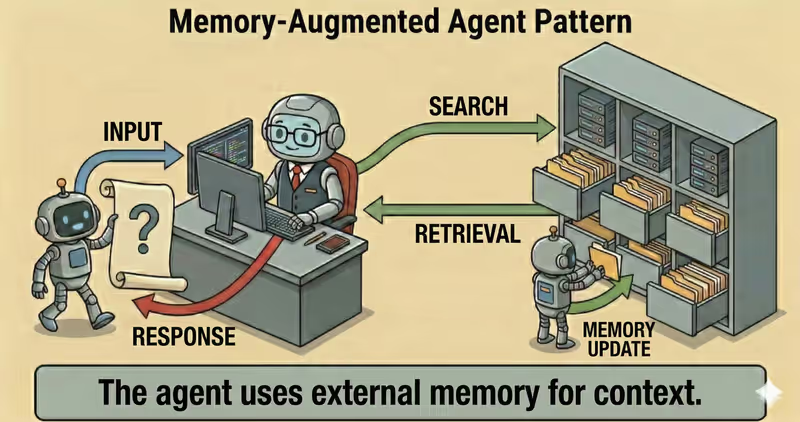
Memory-Augmented Agent is a pattern where the agent has a separate memory layer: it stores important facts, retrieves them when needed, and uses them in later steps or sessions.
When to use it: when facts must be remembered across steps or sessions and used in later decisions.
Instead of a "every request starts from zero" model, the agent:
- captures useful facts from interaction
- stores them in structured memory
- retrieves relevant memory before response
- updates or deletes outdated entries
Problem
Imagine you work with an agent across multiple sessions.
In the first session, you set rules:
- write in Ukrainian
- answer concisely
- apply an exception for Enterprise customers
In the next session, the agent "forgets" this, and you repeat everything.
Without managed memory, each new session looks like the first one for the agent.
Consequences:
- inconsistent responses
- unnecessary user repetition
- errors due to missed context
- lower value in long Workflow
That is the problem: without a memory layer, the agent does not accumulate useful context and works only within the current request.
Solution
Memory-Augmented introduces memory-policy for writing and retrieval across sessions.
Analogy: like a customer card in a service system. Only important information is recorded, not the whole dialogue word-for-word. So the next interaction starts with relevant context.
Key principle: memory must be selective and managed, not "store everything indiscriminately".
The agent may suggest what to remember, but the memory layer determines:
- what can be written
- what should be retrieved for a new request
- when a record is outdated and must be deleted
Controlled process:
- Capture: extract meaningful facts
- Store: save with metadata (
source,timestamp,TTL) - Retrieve: fetch relevant memory
- Apply: include memory in response context
- Update/Delete: remove outdated entries
This gives:
- consistency across sessions
- personalization without repeated instructions
- controlled storage of decisions and exceptions
- fewer manual repetitions for the user
Works well if:
- only meaningful facts are stored
- write/read policy exists (
privacy + scope) - lifecycle is enforced (
TTL,update,delete) - retrieval returns relevant and current entries
The model may "want" to remember anything, but memory-policy defines long-term context content.
How it works
Memory is not the same as full raw chat history.
In production, systems do not store everything - only meaningful facts with date, source, and record lifecycle policy.
Full flow description: Capture → Store → Retrieve → Apply
Capture
The system extracts facts from current interaction: user preferences, decisions, stable parameters.
Store
Facts are written to memory store with metadata: timestamp, confidence, scope, TTL, policy tags.
Retrieve
Before response, the system searches relevant memory entries for this specific request.
Apply
The agent includes those entries in working context and forms response using previous experience.
In code it looks like this
facts = extract_memory_facts(user_message)

approved = supervisor.review_memory_write(
    user_id=user_id,
    items=facts,
)

memory.upsert(user_id=user_id, items=approved)

relevant = memory.search(
    user_id=user_id,
    query=goal,
    top_k=5,
)

context = build_context(base_context, memory_items=relevant)
answer = agent.respond(context)

return answer
Memory must be managed: with size limits, update rules, and deletion of outdated facts.
How it looks during execution
Goal: personalize response using stored user preferences

Session 1:
User: Write responses in English and concisely.
Memory saved:
- language = en (source=session_1)
- response_style = concise (source=session_1)

Session 2:
User: Explain the difference between SLA and SLO.
Retrieve:
- language = en
- response_style = concise

Agent response:
- in English
- in concise format
Full Memory-Augmented agent example
When it fits - and when it does not
Fits
| Situation | Why Memory fits | |
|---|---|---|
| ✅ | Personalization across sessions matters | Memory stores relevant user context and makes agent behavior consistent. |
| ✅ | There are long processes with repeated interactions | The agent continues from prior state instead of restarting each time. |
| ✅ | Stable parameters and prior decisions must be preserved | Memory reduces duplicated decisions and keeps settings stable. |
| ✅ | User context affects response and action quality | The agent uses interaction history and adapts output more accurately. |
Does not fit
| Situation | Why Memory does not fit | |
|---|---|---|
| ❌ | One-off tasks where sessions are not related | State storage adds overhead without practical benefit. |
| ❌ | Strict security policy forbids data storage | A Memory contour cannot satisfy compliance requirements under this model. |
| ❌ | No lifecycle process for memory cleaning and updates | Without retention management, memory gets stale and degrades decision quality. |
Because the memory layer adds operational overhead: storage, indexing, retention, and privacy controls.
How it differs from RAG
| RAG | Memory-Augmented | |
|---|---|---|
| Context source | External knowledge base and documents | Past interactions and user state |
| What it optimizes | Factual accuracy and citability | Consistency and personalization |
| Data type | Policies, reference, documentation | Preferences, decisions, action history |
| Main risk | Weak retrieval | Stale or excessive memory |
RAG answers: "what does the knowledge base say".
Memory-Augmented answers: "what is important to remember about this specific user and process".
When to use Memory-Augmented among other patterns
Use Memory-Augmented when context must be stored and reused across steps or sessions.
Quick test:
- if you need to "remember preferences, decisions, and user state" -> Memory-Augmented
- if you need to "find facts in external documents for the current query" -> RAG Agent
Comparison with other patterns and examples
Quick cheat sheet:
| If the task looks like this... | Use |
|---|---|
| Need to find knowledge in external sources and generate response from it | RAG Agent |
| Need to store and reuse user context between steps or sessions | Memory-Augmented Agent |
Examples:
RAG: "Answer customer questions only using internal policy base and show sources".
Memory-Augmented: "Remember that this customer already selected Pro plan and apply that in the next responses".
Not sure whether this case already needs long-term agent memory? Design Your Agent →
How to combine with other patterns
- Memory + RAG: the agent combines personal context with verified sources so response is both accurate and user-relevant.
- Memory + ReAct: at each step, the agent considers prior decisions to avoid repeating the same actions.
- Memory + Supervisor: Supervisor controls what can be written to memory and what can be retrieved from it.
In short
Memory-Augmented Agent:
- Stores useful facts across sessions
- Retrieves relevant memory before response
- Makes agent behavior consistent
- Improves personalization without losing control
Pros and Cons
Pros
remembers important context across sessions
fewer repeated questions to users
responses become more consistent
works better for long tasks
Cons
memory must be cleaned and updated regularly
risk of storing unnecessary data
stale context degrades response quality
FAQ
Q: Does memory mean the agent remembers absolutely everything?
A: No. In production, only useful facts are stored under selection rules, TTL, and safety controls.
Q: How to avoid storing sensitive or unnecessary data?
A: Use data classification, redaction, field allowlist, and retention/delete policies.
Q: What to do with stale or conflicting memory?
A: Add timestamp and confidence, revalidate critical records, and prioritize newer facts.
What next
Memory-Augmented adds long-term context to the agent.
But how do you verify final response consistency and obvious errors before sending to user?