Pattern essence
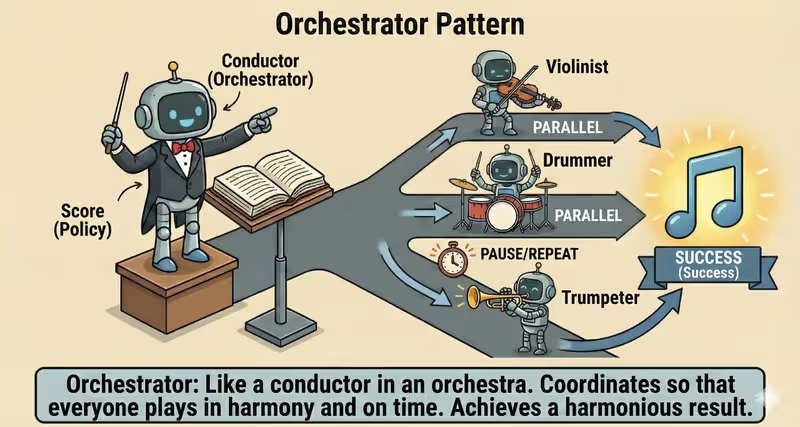
Orchestrator Agent is a pattern where one agent coordinates work across multiple executors: splits the task, delegates subtasks, tracks status, and combines results.
When to use it: when one large task must be distributed across executors and assembled into one result.
Instead of one agent doing everything alone, Orchestrator:
- analyzes the overall goal
- breaks it into subtasks
- sends subtasks to the right agents
- combines their responses into a single result
Problem
Imagine you need to prepare a go-to-market launch.
This is not one action, but several parallel streams:
- content and positioning
- analytics and forecasting
- legal review
- final release plan
When one agent runs everything sequentially, the system becomes "narrow at one point".
Without orchestration, a multi-step task loses speed and becomes fragile to local failures.
As a result:
- the process slows down because of serial execution
- cost increases because of extra load on the execution runtime
- one step failure blocks the whole task
- it is hard to keep timeouts, retries, and deadlines
That is the problem: without coordination across multiple executors, a complex task becomes slow, expensive, and weakly controlled.
Solution
Orchestrator adds a coordination layer to manage multiple executors.
Analogy: this is like a project manager. They do not perform every task themselves, but coordinate the team, order, and dependencies. That reduces delays and conflicts between steps.
Key principle: first coordinate subtasks and dependencies, then execute.
Separate agents execute subtasks, while orchestrator-policy defines the rules:
- what to run in parallel
- what to wait for sequentially
- how to handle
timeout/retry/fallback - when to consider the result complete
Controlled process:
- Planning (Plan): break the goal into subtasks and dependencies
- Dispatch: assign executors and limits
- Parallel Execute: run independent steps simultaneously
- Aggregate: collect results from executors
- Validate/Done: validate the final output and finish
Monitoring (retries, timeouts, statuses) runs throughout execution.
This gives:
- lower total execution time
- control of partial failures
- centralized limits and rules
- a consistent final result
Works well if:
- the plan has explicit dependencies
- timeout/budget limits are set for executors
- there is policy for
retry/fallback/partial result - aggregation validates completeness and consistency
The model may "want" to run everything at once or everything in sequence, but orchestrator-policy is what fixes the right order and boundaries.
How it works
Orchestrator does not execute subtasks itself.
It controls the process:
- who should receive each subtask
- what time or budget limits to apply
- when to restart a failed step
- when to finish the full process
Full flow description: Plan → Dispatch → Parallel Execute → Aggregate
Planning (Plan)
The agent builds the plan: which subtasks are needed, what dependencies exist, and what can run in parallel.
Dispatch
The system sends subtasks to the needed agents or services.
Parallel Execute
Each executor handles its part through its own Think → Act → Observe loop.
Aggregate
Orchestrator collects results, validates completeness, and forms the final answer.
In code it looks like this
plan = plan_tasks(goal)

jobs = [dispatch_async(worker, task) for worker, task in plan]  # start parallel subtasks
results = await gather_with_limits(jobs, timeout_sec=30)  # collect with timeout/limit policies
results = retry_timeouts_once(results)  # simple example: one retry for timeout

final = aggregate(results)
return final
Orchestrator starts subtasks in parallel and waits for results with timeouts and limits.
How it looks during execution
Goal: prepare a go-to-market plan

Plan:
- Agent A: market and competitors
- Agent B: financial model
- Agent C: risks and compliance

Dispatch: all three subtasks start in parallel

Observe:
- Agent A: done in 6 s
- Agent B: done in 9 s
- Agent C: timeout, restart
- Agent C: done in 5 s after retry
- Between stages: results after retry return into the shared set for aggregate

Aggregate:
- A + B + C collected (C after retry)
- error policy applied
- single document produced
Full Orchestrator agent example
When it fits - and when it does not
Fits
| Situation | Why Orchestrator fits | |
|---|---|---|
| ✅ | The task can be decomposed into several independent parts | Orchestrator distributes subtasks across executors and coordinates them in parallel. |
| ✅ | It is important to reduce time via parallel execution | Running subtasks at the same time reduces total wait time for the result. |
| ✅ | Different specialized agents are required | Each agent gets its own role, and Orchestrator synchronizes their work. |
| ✅ | Control of timeouts, retries, and aggregation is required | The pattern adds execution control and one collection point for the final result. |
Does not fit
| Situation | Why Orchestrator does not fit | |
|---|---|---|
| ❌ | The task is small and single-step | The coordination layer adds overhead where one executor is enough. |
| ❌ | All steps are strictly sequential | If parallelism is impossible, orchestration provides almost no gain. |
| ❌ | Infrastructure does not support reliable parallelism | Without stable execution, retries, and state control, orchestration becomes fragile. |
Because Orchestrator adds extra coordination: task queues, waiting for results, and response aggregation.
How it differs from Routing
| Routing | Orchestrator | |
|---|---|---|
| What it decides | Who should get the task | How to manage multiple executors |
| Active agents | Usually one | Multiple at once |
| Focus | Classification and handoff | Coordination, timing, and result assembly |
| Output | Task handed to executor | Final combined result |
Routing answers: "who should receive the task".
Orchestrator answers: "how to synchronize multiple tasks and assemble the result".
When to use Orchestrator among other patterns
Use Orchestrator when there are multiple dependent steps and the correct execution order matters.
Quick test:
- if you need to "run a task through a clear chain of steps" -> Orchestrator
- if you need to "only choose the executor for a request" -> Routing Agent
Comparison with other patterns and examples
Quick cheat sheet:
| If the task looks like this... | Use |
|---|---|
| You need to choose one best executor | Routing Agent |
| There is a sequence of steps and order matters | Orchestrator Agent |
| You need a policy-check before final output | Supervisor Agent |
| Multiple agents must reach one conclusion | Multi-Agent Collaboration |
Examples:
Routing: "Customer asks for a refund - send to Billing, not Sales".
Orchestrator: "Prepare a release: first changelog, then QA, then deploy".
Supervisor: "Before sending an email, check policies, compliance, and prohibited promises".
Multi-Agent Collaboration: "Marketing, Legal, and Product must agree on one final campaign text".
Not sure whether you need an Orchestrator to coordinate multiple branches? Design Your Agent →
How to combine with other patterns
- Orchestrator + Routing — Routing chooses the executor for a subtask, and Orchestrator tracks the overall workflow.
- Orchestrator + ReAct — each agent executes its part step by step, while Orchestrator assembles everything into one plan.
- Orchestrator + Supervisor — before critical actions, policies, risks, and execution budget are checked.
In short
Orchestrator Agent:
- plans subtasks
- delegates them to executors
- manages parallel execution
- assembles the final result
Pros and Cons
Pros
centrally manages the whole process
clearly distributes tasks among executors
controls order and priorities better
convenient to monitor progress
Cons
becomes a critical system point
route configuration can be complex
an orchestrator failure affects the whole flow
FAQ
Q: Does Orchestrator always run subtasks in parallel?
A: No. Some steps can run sequentially if there are dependencies between them.
Q: What to do if one agent did not return a result?
A: Define an error policy: retry, timeout, fallback, or partial result. Orchestrator applies this policy before final aggregation.
Q: Is Orchestrator needed if Routing already exists?
A: Routing chooses one executor. Orchestrator coordinates many executors, often using Routing inside each subtask.
What next
Orchestrator coordinates work of multiple agents at once.
But who ensures they do not violate policies, budget, and security rules?