When an agent first starts working on its own, it feels like a win.
You no longer write instructions, don’t control every step, and don’t jump in after every mistake.
You just say: “Do this” and the system works.
It finds data, tries tools, changes the approach if something didn’t work. And eventually it comes back with a result.
But right at that moment, a new problem appears.
Because an agent that can act on its own can act without you.
And that means it can:
- spend money
- change data
- call APIs
- start processes
Without your approval for every step.
And if you don’t set boundaries, it will keep working even when it shouldn’t. Sometimes, right up until you open the bill and see the number.
What “boundaries” mean in practice
When we talk about boundaries for an agent, it’s not about trust.
It’s about constraints that define where it can act and where it must stop.
Here’s what that looks like in practice:
1. Budget
How much is the agent allowed to spend?
This can be money for APIs, tokens, or compute time.
If the limit is reached, the work stops.
2. Time
How much time can the agent spend on a task?
If it didn’t finish by the deadline, it returns with what it has.
3. Allowed actions
What is the agent allowed to do at all?
- Read data?
- Send emails?
- Start processes?
- Delete files?
Not everything it can do is something it’s allowed to do.
4. Tool access
Which services can it reach?
Which APIs can it call?
Which databases can it read?
Less access means less risk.
5. Stop conditions
When should the agent stop working?
For example:
- If the result isn’t improving
- If spend exceeded the limit
- If data is contradictory
| Boundary | What it limits | What happens when exceeded |
|---|---|---|
| 💰 Budget | API or token spend | The agent stops |
| ⏱ Time | Task execution duration | Returns a partial result |
| 🔐 Actions | What the agent is allowed to do | Action is denied |
| 🛠 Tools | Which services it can access | Request is blocked |
| 🛑 Stop conditions | When to finish the work | The loop is terminated |
Boundaries are not an obstacle for the agent.
They are how you turn it into a safe executor, not an uncontrolled process.
What happens when there are no boundaries
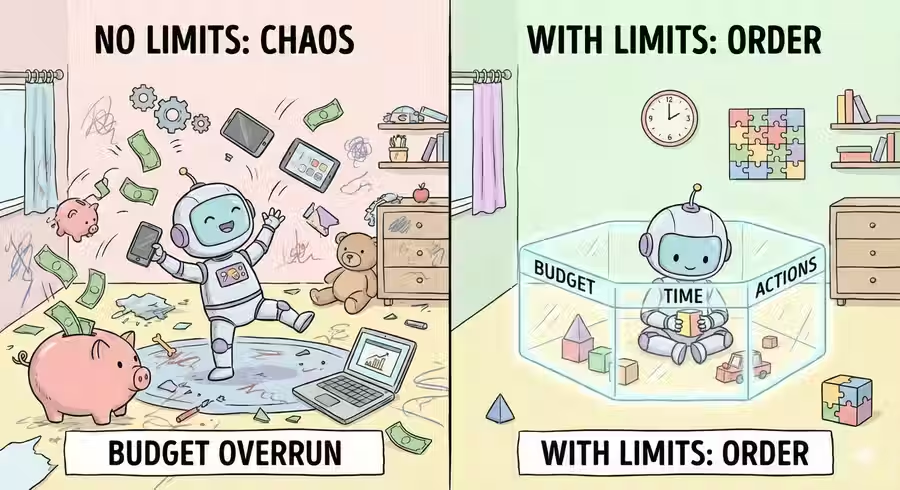
The agent gets a task.
For example: “Optimize infrastructure spend.”
It starts acting.
It finds a high-cost service and lowers the limit. It checks, spend drops.
But the result is still not ideal.
It keeps searching. It finds another process, also expensive. It limits it.
It checks, spend drops again.
But along with it, performance.
Some requests start returning errors. The service responds slower. Users complain.
The agent doesn’t “understand” that. It only sees the goal: reduce spend.
And it keeps acting.
One more limit. One more optimization. One more step in the “right” direction.
Until eventually it reduces spend so much that the system stops working.
Not because of an outage.
But because of diligence.
The agent did exactly what you asked.
Just without boundaries.
The key insight
An AI agent is dangerous not because it makes mistakes. And not because it is “too smart.”
It is dangerous because it does not stop on its own.
The agent acts until it:
- reaches the goal
- or hits a constraint
And if there are no constraints, it will keep moving forward, even when that harms the system.
Because for it, this is not harm.
It is just another step toward the result.
That is why boundaries are not a limitation for the agent.
They are protection for you.
In short
An AI agent can act independently.
But without set boundaries, it will keep moving toward the goal even when that harms the system.
FAQ
Q: Why does an AI agent need boundaries?
A: To limit its actions and spending while working on a task, and to stop execution when it starts harming the system.
Q: What can happen without boundaries?
A: The agent can keep working toward the goal even when this causes errors, lower performance, or unnecessary spend.
Q: When should the agent stop?
A: When the result is reached, or when one of the stop conditions is met, such as budget or deadline being exceeded.
What’s next
Now you know why boundaries are critical.
But to set them correctly, you need to understand what an AI agent is made of.
Because boundaries are not just numbers in settings. They are constraints on specific parts of the system:
- on the goal the agent is pursuing
- on the memory it uses for context
- on the tools it can use
- on the loop that defines how many times it will try
If you do not understand how an agent works on the inside, you will not be able to control it from the outside.
That is what the next article is about.